Analytics
To help you measure performance, attribute conversions, and optimize marketing campaigns, the Distribusion whitelabel booking engine supports tracking through both custom booking identifiers and UTM parameters. This allows you to analyze where bookings are coming from, tie them back to specific campaigns, and monitor conversion activity using tools like Google Analytics.
Booking ID Tracking
You can track the booking reference by passing the retailerBookingNumber as a URL parameter.
This value will appear in the Transaction Overview report that we provide monthly by default or daily upon request.
Example
https://book.distribusion.com/checkout?[...]&retailerBookingNumber=111111UTM Tracking
For source and campaign attribution, you can append standard UTM parameters to the whitelabel URL:
utm_id | Campaign Code |
utm_source | Source |
utm_medium | Medium |
utm_campaign | Campaign |
utm_term | Keyword |
utm_content | Ad Content |
Example
https://book.distribusion.com/landing ?[...]&utm_source=newsletter&utm_medium=emailSDK Widget
If you're embedding the booking widget via SDK, you can pass UTM parameters programmatically:
Search Widget
<div id="distribusion-search"></div>
<script src="https://book.distribusion.com/sdk.1.0.0.js"></script>
<link href="https://book.distribusion.com/sdk.1.0.0.css" rel="preload">
<script>
window.addEventListener('load', () => {
const root = document.getElementById('distribusion-search')
Distribusion.Search.mount({
root,
partnerNumber: 222222,
locale: 'en',
currency: 'EUR', // optional
defaults: { // optional
departureStation: 'CODE', // or
departureArea: 'CODE', // or
departureCity: 'CODE',
arrivalStation: 'CODE', // or
arrivalArea: 'CODE', // or
arrivalCity: 'CODE'
},
utm: { // optional
utm_campaign: 'VALUE',
utm_content: 'VALUE',
utm_id: 'VALUE',
utm_medium: 'VALUE',
utm_source: 'VALUE',
utm_term: 'VALUE'
}
})
})
</script>Route Widget
<div id="distribusion-search"></div>
<script src="https://book.distribusion.com/sdk.1.0.0.js"></script>
<link href="https://book.distribusion.com/sdk.1.0.0.css" rel="preload">
<script>
window.addEventListener('load', () => {
const root = document.getElementById('distribusion-search')
Distribusion.Search.mount({
root,
partnerNumber: 222222,
partnerBookingNumber: 222222,
locale: 'en',
currency: 'EUR', // optional
defaults: { // optional
departureStation: 'CODE', // or
departureArea: 'CODE', // or
departureCity: 'CODE',
arrivalStation: 'CODE', // or
arrivalArea: 'CODE', // or
arrivalCity: 'CODE'
},
utm: { // optional
utm_campaign: 'VALUE',
utm_content: 'VALUE',
utm_id: 'VALUE',
utm_medium: 'VALUE',
utm_source: 'VALUE',
utm_term: 'VALUE'
}
})
})
</script>Google Tag Manager Setup
To enable conversion tracking in Google Analytics via Google Tag Manager:
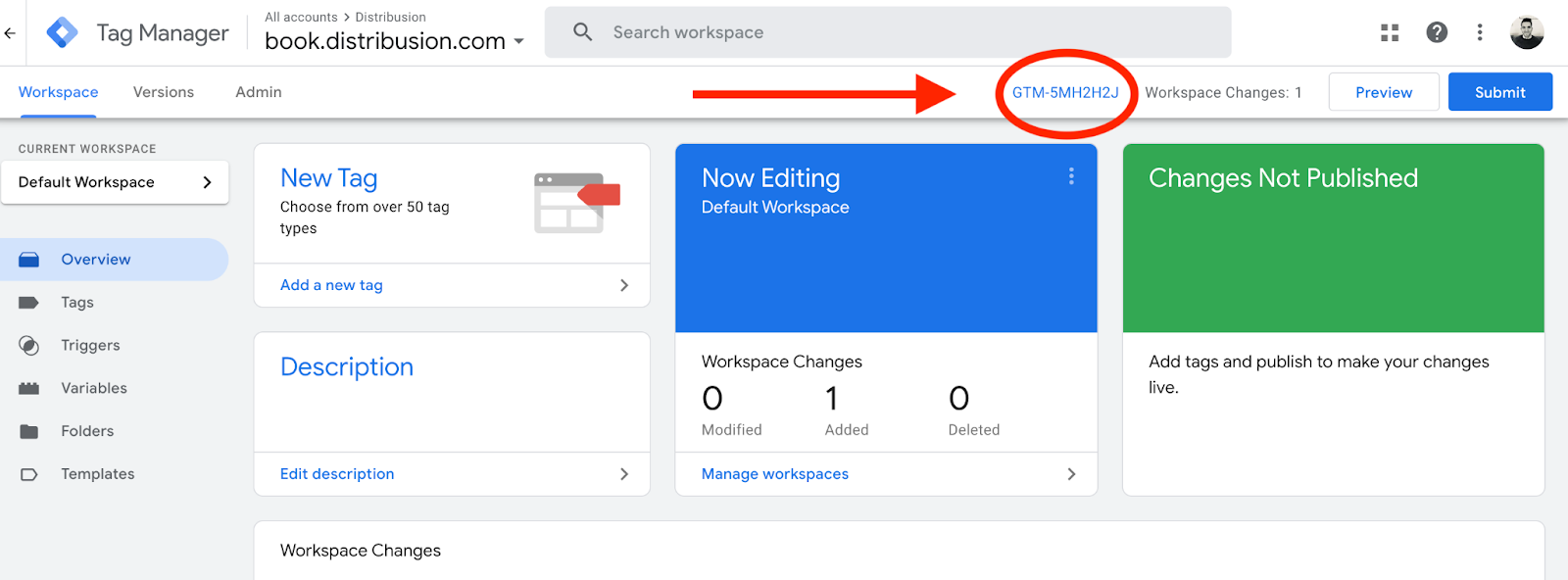
1. Share your GTM Container ID with us (format: GTM-XXXXXXX)
- Login into https://tagmanager.google.com/
- Get the GTM ID from the page
2. We will configure the whitelabel integration and expose the required data layer.
3. On your end, set up event tracking in GA using your GTM container.
- In your GTM account, create a Data Layer Variable (e.g.,
utmContent) that matches the key (e.g.utm_Content) used in the data layer. - Add this variable to your conversion tag in GTM to start tracking
If you want to, you can also share the Google Analytics container ID, for example: UA-1319168-1.


On this page
- Analytics